Building a Digital Wallet: From Ledger to Launch
Discover how to design, build, and scale digital wallets with confidence. This ebook covers architecture, balance calculations, and implementation strategies using Modern Treasury.
Contents
Introduction
What is a Digital Wallet?
A digital wallet (also called an electronic wallet) is a software application that securely stores digital payment information, banking details, and credentials—enabling users to make payments from their devices without entering data for each transaction.
Most digital wallets allow you to:
- Store virtual versions of credit or debit cards
- Link to bank accounts for ACH-based payments
- Pay in-store using a phone or wearable
- Pay online without manually entering details
- Hold and spend from a wallet balance
Beyond payment details, digital wallets may also store:
- Transit or boarding passes
- Loyalty and membership cards
- Gift cards or store credit
- Event tickets or hotel keys
- IDs (e.g., driver's licenses)
Why Build a Digital Wallet?
Companies like Apple, Starbucks, Cash App, and Splitwise have shown that embedding wallet functionality into products unlocks new business models, improves customer experience, and creates more control over money movement.
More product teams are choosing to bring payments in-house—either to control the user experience, reduce third-party fees, or enable features like balance-based spending and instant payouts. Wallets can help:
- Lower costs by moving funds over ACH or RTP instead of card rails
- Improve cash flow through balance preloading
- Increase loyalty and retention through faster, smoother payment experiences
- Centralize transaction data and simplify reconciliation
Who Should Read This Guide?
This Guide is For:
- Developers at fintechs building wallet-type products that store funds, facilitate money movement, and all that entails.
- Engineers integrating payment providers, ACH, RTP, or card systems.
- Product teams designing wallet apps to embed their financial flows within their product.
What To Expect
We'll walk you through:
- Considerations for architecting your digital wallet
- Design challenges of calculating balances
- An example wallet UX and funds flow
- A technical implementation guide to build your wallet using Modern Treasury
Hopefully, this guide will help you streamline your design and production process and minimize bugs and errors while building a digital wallet product.
Considerations for Your Digital Wallet: Architecture
When building a digital wallet, the first technical decisions often revolve around banks, payment rails, and ledgers. But none of that matters if the user experience doesn't work. For products that move money—especially wallets—it's the user-facing parts that shape trust: signup flows, balance visibility, and payout timing.
Behind every good wallet UX is a robust payment ops setup. To support real-time balances, accurate reporting, and regulatory compliance, you'll need to make key architectural decisions about how funds are held, tracked, and reconciled. Here's how to approach building the payments infrastructure for a wallet product like Pay2Day.
Step 1: Decide on the structure of your underlying bank account.
The most straightforward option would be to set up an FBO, or "For Benefit of," account with your bank partner. An FBO account allows your company to hold and manage funds on behalf of their users, without assuming legal ownership of those funds—an important distinction when serving consumers or contractors at scale. Funds held in an FBO account are legally attributed to the end-users but operationally controlled by the platform.
An FBO account offers regulatory coverage, helping companies avoid the cumbersome process of becoming a money services business (MSB); though, this is another option. Instead, they can attribute ownership of the account to the bank's EIN, or their tax ID, to avoid these regulations. Banks are de facto money transmitters, so they don't have to worry about registering for a Money Transmitter License (MTL), a time-consuming process that varies from state to state.
Aside from regulatory coverage, businesses may also open an FBO account for insurance purposes. In some cases, you can have up to $250,000 in FDIC insurance on each virtual account under an FBO account. For neobanks, this gives clients a personalized experience with insurance benefits.
Step 2: Decide on a mechanism for issuing separate accounts for each user.
To isolate funds and enable direct inflows and outflows for individual users, you'll want to issue virtual accounts (also known as subsidiary accounts or sub-accounts) under the umbrella of the FBO account (often referred to as the omnibus account). Each virtual account has its own account and routing number, making it possible to:
- Streamline incoming and outgoing transaction data
- Attribute incoming deposits to specific users
- Simplify reconciliation with unique identifiers
Virtual accounts function similarly to standard bank accounts. The most notable difference is that virtual accounts cannot actually hold money. They receive it, collect necessary information about the sender, and pass it over to the omnibus FBO account. It's advantageous to pair them with a double-entry ledger to track all of your business transactions.
Step 3: Implement a Double-Entry Ledger for Tracking Transactions and Balances
A ledger is a timestamped log of events that have a monetary impact, ensuring:
- ACID compliance, including Immutability and traceability of transactions
- Clean audit logs for regulatory and accounting needs
- Accurate balances exposed to the end-user
Because the balance of your omnibus FBO account only reflects the aggregate balance held across all users, this ledger helps maintain accurate balances at the user (virtual account) level. These accounts are classified as debit normal or credit normal.
Transactions recorded in the ledger have two or more entries, which belong to an account.
- Entries change balances based on account type and entry direction.
- Debits—or entries on the debit side—increase the balance of debit normal accounts, while credits decrease it.
- Credits—or entries on the credit side—increase the balance of credit normal accounts, while debits decrease it.
- The system is correct if the sum of balances of all credit normal accounts matches the sum of balances of all debit normal accounts. This means all money is properly accounted for.
How can you apply this with software? To implement double-entry accounting in code, you'll need:
- Ledger Object: Represents the entire system of accounts and transactions
- Account Object
- Has a
normality: debit or credit - Represents a balance bucket
- Has a
- Transaction Object
- Contains two or more entries
- Must be balanced: debits = credits
- Entry Object
- Belongs to one transaction and one account
- Includes
amountanddirection(debit or credit)
You can learn more about the conventions around proper double-entry design from our primer, Accounting for Developers.
Getting Set Up With Modern Treasury
Modern Treasury partners with several banks that offer FBO accounts with virtual account capabilities. Using the Virtual Accounts API, developers can:
- Programmatically issue accounts to users from within their app
- Receive unique account/routing numbers per user
- Monitor deposits and transaction activity in real time
To complement this, the Ledgers API allows you to:
- Create double-entry ledger accounts for every wallet user
- Post ledger transactions for deposits, withdrawals, and internal transfers
- Query balances and transaction histories via API
Together, these APIs form the foundation for building programmable money movement and wallet infrastructure that scales with your product.
Architecture Design Challenge: Calculating Wallet Balances
When customers open their digital wallet, the "balance" they see can mean several different things, depending on the context. It can represent fully cleared money, authorized but unsettled money, or even remaining available credit for borrowing. Engineers building digital wallets must provide a source of truth for the question: "What's my balance?"
Businesses rarely expose raw ledger entries directly to end users. Instead, they compute and surface different balance types depending on the use case. This article explains what balance types are, why they exist, how fintech companies define them differently, and the engineering challenges of supporting them at scale.
What Balance Types Are Needed in a Wallet?
You can think of a balance type as a calculated view of an account balance based on a subset of ledger transactions grouped according to a pre-defined business criteria:
- In a ledger database, every transaction is recorded immutably as a debit and a credit.
- A balance is simply an aggregation of those transactions over time.
- A balance type defines which subset of transactions count toward that aggregation (e.g., only posted transactions, or both posted and pending).
Wallet balance types are abstractions of this underlying ledger, and they allow systems to answer questions like:
- How much money has fully settled? (posted_balance helps internal users for reconciliation purposes)
- How much can the customer spend right now? (available_balance prevents overspending and failed transactions)
- What has the customer purchased recently? (pending_balance helps end users see transactions in motion)
This flexibility is crucial for wallet products, but it also creates complexity for developers as different products, regions, or institutions may define balance types differently.
Core Balance Types
1. Posted Balance
The posted balance represents transactions that have fully settled. It is the most conservative and reliable measure of account value. In a wallet product, the posted balance is the basis for reconciliation, reporting, and compliance. It reflects the true, final state of funds.
Formula: Posted Balance = Σ(Posted Inflows) – Σ(Posted Outflows)
Example: Let's look at a merchant wallet for "TechGear, Inc" on an ecommerce platform.
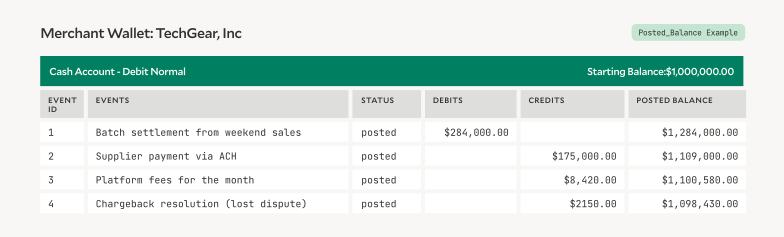
Posted Balance = 1,000,000 + 284,000 - (175,000 + 8,420 + 2,150) = ~$1.1M
2. Pending Balance
The pending balance includes transactions that have been authorized but not yet settled. These typically appear in card payments or electronic transfers (e.g., ACH, where money is in motion but not final). Pending balances give customers a more up-to-date view of their activity, but are less reliable since some pending items may never post (think of it like the incidental hold on your card placed at the beginning of a hotel stay will eventually expire).
Formula: Pending Balance = Σ(Pending Inflows) – Σ(Pending Outflows)
Example: Let's look at a business account for "VeryVest," processing end-of-day activities on an investing platform.
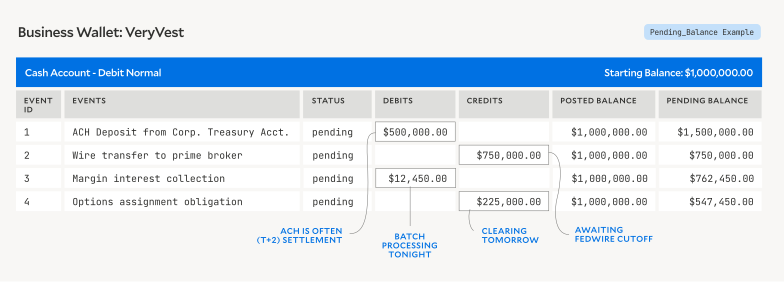
Pending Balance = 1,000,000 + (500,000 + 12,450) - (750,000 + 225,000) = ~$547k. This balance represents authorized but unsettled transactions moving through various clearing networks (e.g., Nacha, Fedwire, Options Clearing Corporation).
3. Available Balance
The available balance is what we colloquially consider a "balance"; it's the most customer-facing use: what a user can spend right now. It combines posted and pending transactions to reflect spendable funds.
Formula: Available Balance = (Posted Inflows + Pending Inflows) – (Posted Outflows + Pending Outflows)
Example: Let's look at a property management company "Mod Condo, LLC" holding funds for a rewards platform:
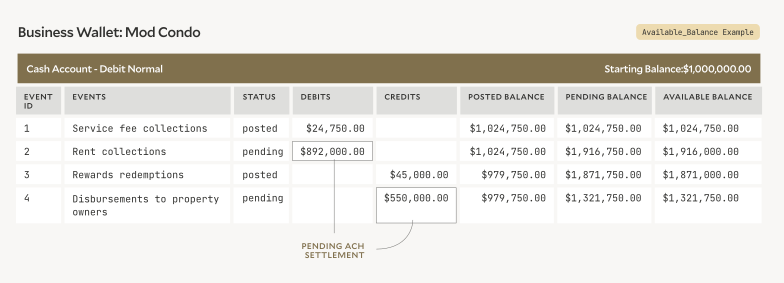
Available Balance = 1,000,000 + (24,750 + 892,000) - (45,000 + 550,000) = ~$1.3M. This is how much the property manager can allocate for immediate rewards purchases or owner distributions.
4. Credit or Limit-Based Balances
For wallets that are the user-facing application of a lending or credit product, balance types often include credit limits or remaining spend capacity.
Formula: Available Credit = Credit Limit – (Posted Outflows + Pending Outflows). This definition flips normal account "balance" logic: pending outflows increase as the user spends, reducing available credit.
Example: Let's look at the available funds merchant partner "Lux Office Supply Corp" has at a BNPL underwriting platform:
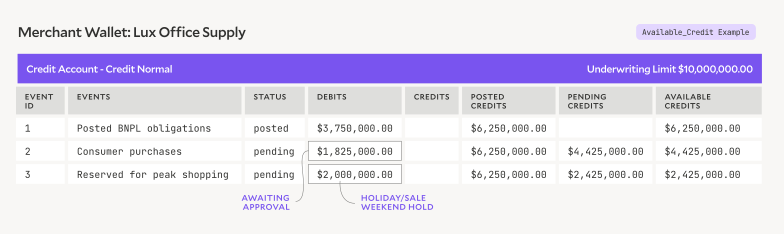
Available Credit = $10,000,000 - (3,750,000 + 1,825,000 + 2,000,000) = ~$2.4M. This means Lux can approve up to $2.4M more in BNPL transactions before hitting their underwriting cap.
How Wallet Companies Use Balance Types
Fintechs designing wallets vary in their use of balance types. Although almost all have a form of the core balance types 1–3 above, most wallet providers usually emphasize available balances for UX (e.g., Paypal, CashApp, Venmo are all consumer wallets that expose the available balance as a default). However, even this can vary:
Alternative Balance Types and Calculations
1. One of our fintech-as-a-service (FaaS) customers has a wallet they white-label for their clients. They designed this wallet to have four balance types:
- The usual suspects:
available,pending,posted - And another balance type: reserved_balance, for earmarked amounts not yet spent (e.g., holds). They differentiate this from
pending_balanceswhich are balances awaiting completion. - This design supports wallets that must serve both customer-facing queries and compliance/reconciliation.
2. A fintech firm offering credit building services has a wallet as the user-facing app; they calculate their available_balance with this formula:
Available = Pending Inflows + Posted Outflows
In this case, it is calculated nearly opposite to what we'd expect. It's a pessimistic balance, but pessimistic here means assume the balance is as large as possible (i.e., once the payment is reposted, they want to show the available balance going back up immediately). This makes sense for this company that is focused on credit-building and manipulating the customer-facing metric to help improve credit profiles.
These are just a few examples of how balance types will vary across businesses, and why it's so important to accurately chart and model accounts, as varied definitions can increase engineering complexity. The most important thing to optimize for is customer trust: wallets need to show balances in a way that matches expectations.
Engineering Challenges With Multiple Balance Types
1. Atomicity and Consistency
When a transaction posts, multiple balances (posted, pending, available) need to update together. If only one updates, the system drifts out of sync.
-- Example: two updates that should be atomic
UPDATE balances SET posted = posted + 1000
WHERE account_id = 'acct_123';
UPDATE balances SET available = available +
1000 WHERE account_id = 'acct_123';
If the second query fails (e.g., network blip), posted ≠ available. The ledger remains correct, but balance views are inconsistent. This risk multiplies under high concurrency, as many tries are going through at once. Failed payments = bad UX.
2. Balance Drift
Cached balances may drift from true ledger values if writes fail or reconciliation lags (e.g., if the available balance shows as $5,000, but in reality it is $4,750 due to a missed pending entry). This can immediately break trust.
# Cache update fails but ledger writes succeed
ledger.insert(txn)
try:
    cache.update_balance(txn)  # network error here
except:
    pass  # drift introduced: cache ≠ ledger
3. Multi-Currency Wallets
Customers and partners have the same rapid response expectations for their wallets, even with added complexity of multi-currency (e.g., stablecoins or foreign currency). This means balances need to be tracked separately, with FX conversions as a snapshot for total wallet balance calculations.
Strategies to Address These Challenges
Always Anchor Balances to a Ledger
Keep balance logic modular: ledger = source of truth; APIs = interpretation layer. Document balance definitions explicitly for end users and developers.
Balance Caching with Reconciliation
Cache balances for performance. Periodically reconcile against the ledger to detect drift.
Strong Ledger Guarantees
Use immutable, double-entry transactions to ensure every balance calculation has a solid foundation.
Flexible Balance Objects
Expose balances through structured APIs (e.g., Modern Treasury's Ledger Balances), allowing different balance views to coexist. For lending wallets, define clear rules (e.g., what counts toward available balances and how limits interact).
Locking and Versioning
Apply mechanisms like lock_version on ledger writes to avoid race conditions. Use pessimistic logic to help prevent failed transactions.
Summary
If you're designing a wallet, don't treat "balance" as one field. These definitions shape customer trust. Getting them right means preventing failed payments, ensuring compliance, and enabling new products to thrive. Some tips for the road:
-
Define your balance types up front. a. Document posted, pending, and available balances. b. Decide which are customer-facing vs. internal.
-
Tie balance updates to immutable ledger entries. a. Never update balances independently of transactions. b. Use database transactions to keep posted, pending, and available balances consistent.
-
Plan for drift detection. a. Build reconciliation jobs that compare cached balances against the ledger. b. Alert when mismatches cross a tolerance threshold.
-
Expose balances clearly in APIs. a. Name fields explicitly (available_balance, pending_balance, etc.). b. Link to docs that explain exactly how each is calculated.
Multiple balance types are a necessary feature of wallets, but supporting them introduces challenges for engineers. Each definition solves a real business need, but only when implemented carefully.
Start by mapping which balances your wallet needs today. Then, build your schema so that adding new balance types later won't require a rewrite. The challenge is to make sure your underlying ledger can scale across balance definitions without sacrificing reliability. We've done it, so we can help. Read our documentation or reach out to our team.
Principles in Practice: Product and Concepts for Your Digital Wallet
In this chapter, we'll walk through how to set up the core infrastructure behind a digital wallet. These steps cover the concepts of creating a ledger, provisioning user-level ledger accounts, connecting external accounts, and enabling money movement. In Chapter 4, we'll get into the technical implementation and actual API calls.
Product Design: Understanding the UX
Let's say you're building a wallet called Pay2Day designed for gig workers: food delivery couriers, rideshare drivers, and other shift-based earners. Pay2Day's value prop is providing access to earned wages daily, so gig workers don't need to wait until the end of the paycycle.
To do this, Pay2Day integrates directly with partner marketplaces to access worker earnings data and prefunds corresponding amounts available. At the end of the paycycle, Pay2Day collects repayment from the marketplace to settle the funds they've advanced to the worker.
Here's what the user flow could look like:
- User sign up: Wendy Worker signs up for a Pay2Day account, and connects it to her account for the gig platform she works for.
- KYC + account creation: Pay2Day verifies Wendy's identity and tax information, then provisions a wallet account.
- Balance available: Pay2Day fetches verified earnings data on GoGrocery and deposits the corresponding amount to Wendy's Pay2Day wallet.
- Funds access: Wendy can either initiate a withdrawal to her linked bank account, or spend directly from her Pay2Day balance.
Technical Requirements to Enable this Flow
To make the above experience work in production, you need to stitch together several financial infrastructure and payments capabilities directly into Pay2Day:
- Virtual account issuance: A partner bank must provide and manage virtual accounts to hold wallet funds.
- Payout support: You'll need to be able to send and receive money via ACH debit/credit, and possibly real-time rails such as RTP or FedNow.
- A double-entry ledger: Every wallet account must be backed by a ledger that logs debits, credits, and balance updates immutably.
- Balance calculation logic: Real-time account balances must reflect pending and posted transactions.
- Transaction reconciliation: Incoming and outgoing payments must be reconciled against bank statements accurately.
The infrastructure decisions you make here will shape your system's performance, ledger consistency, and support for edge cases.
Example Use-Case: Conceptual Infrastructure Overview
Defining Account and Transaction Logic
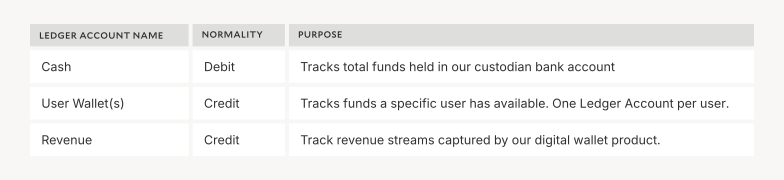
Ledger Accounts represent the most specific balances that we need to track. Pay2Day requires that we track each end-user's wallet balance as well as the total cash balance in our bank account. We'll also track revenue earned from any direct transaction fees we charge.
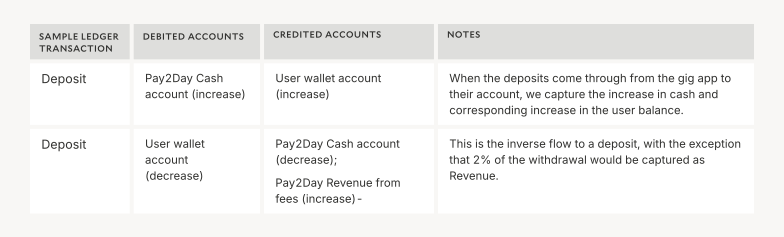
Ledger Transactions represent the events that happen in our funds flow: what actions need to occur in Pay2Day's digital wallet, and how do they change our account balances above? The table below shows the most common user actions supported by digital wallet apps and how they should be recorded to the Ledger.
💡 Note: For a refresher on account normality and how debits and credits work, review our guide to debits and credits.
Set Up Pay2Day's Ledger
We'll begin with a double-entry ledger so that we can track ledger transactions. This ledger will include:
- Individual user accounts to track each user's balance
- A shared cash account to track the funds cash held by Pay2Day
Create a Ledger Account for Each User
Create an individual Ledger Account for each Pay2Day user. Use the normal balance: "credit" to indicate account normality, because the funds you (Pay2Day) hold on behalf of the user is considered a liability.
Create a Cash Ledger Account for Pay2Day
Track total cash held by Pay2Day with a dedicated debit-normal account. This account will be updated whenever there are deposits and withdrawals from an individual user's account.
Create a Counterparty for Each User
A Counterparty represents any external individual or business that you transact with. Creating a counterparty makes it easy to withdraw from or deposit funds to the external bank accounts used by Pay2Day users.
Create a Virtual Account for Each User
This is the last step required to enable users to store funds within your wallet on Pay2Day. Virtual Accounts enable users to receive and send funds via their own unique routing and account numbers.
Modern Treasury will automatically create ledger transactions for incoming and outgoing payments, updating the correct user and platform accounts. The balance of each account will be updated automatically so that it can be exposed to the user within the Pay2Day app.
Deposit Flow
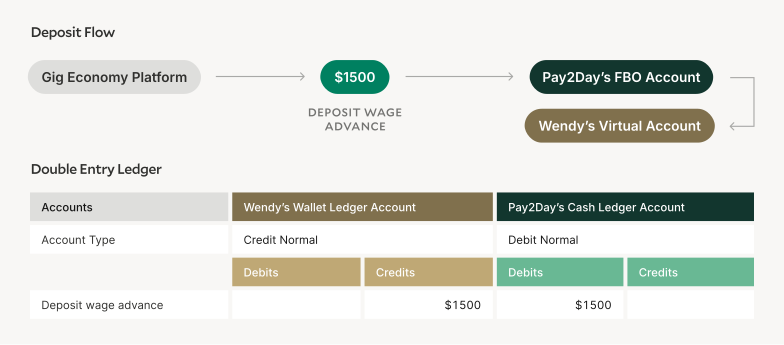
Create a Payment Order When a User Withdraws Funds
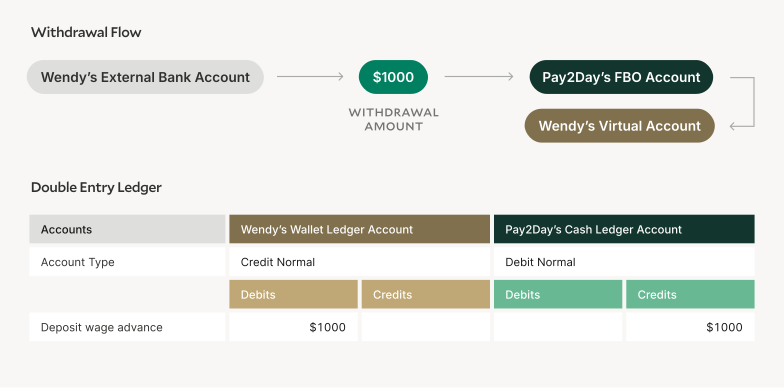
When Wendy wants to access her daily earnings, you'll need to create a Payment Order to move funds from the external bank account Pay2Day is using to fund wage advances.
Withdrawal Flow
That's the high-level flow: set up a ledger, issue accounts, link to external rails, track and reconcile balances. In the next chapter, we'll walk through the exact API calls and technical details you'll need to implement this in production.
A Technical Implementation Guide
While what we just walked through in Chapter 3 was a high-level, happy-path version for a specific use case and concept definition, this chapter serves as a complete technical implementation guide, covering everything from ledger design to transaction processing.
Modern Treasury's Ledgers API provides the foundation for building production-ready digital wallets using double-entry accounting principles. Combined with our Payments API, you can create a complete money movement solution that handles complex financial operations while maintaining compliance and auditability.
Use Case Overview
This tutorial will explain how to use Modern Treasury's Ledgers API to build a digital wallet app. We'll design a Ledger for a platform called SendCash that enables users to deposit money and send it to their friends.
In Chapter 3, we introduced Pay2Day. Here, we'll use a simplified wallet app called SendCash to illustrate how to set up a ledger and post transactions:
Step 1: Create Your Ledger and Ledger Accounts
Before we can post any Ledger Transactions, we'll need to instantiate our Ledger.
Create a Ledger using the Create Ledger endpoint (POST /ledgers).
curl --request POST \
  -u ORGANIZATION_ID:API_KEY \
  --url https://app.moderntreasury.com/api/ledgers \
  -H 'Content-Type: application/json' \
  -d '{
    "name": "SendCash Ledger",
    "description": "Represents our USD funds and User Balances"
  }'
Modern Treasury will return a Ledger object with a UUID to be used in subsequent steps.
{
    "id": "<ledger_id>",
    "object": "ledger",
    "name": "SendCash Ledger",
    "description": "Represents our USD funds and User Balances",
    "active": true,
    "metadata": {},
    "live_mode": true,
    "created_at": "2025-09-04T16:48:05Z",
    "updated_at": "2025-09-04T16:48:05Z"
}
Next, create the four Ledger Accounts required for our initial Ledger Transactions using the Create Ledger Account endpoint (POST /ledger_accounts).
Our bank account balance is normal_balance = debit because it represents a cash balance that we hold, whereas the user wallet accounts are normal_balance = credit because they represent balances that we owe to our users.
curl --request POST \
  -u ORGANIZATION_ID:API_KEY \
  --url https://app.moderntreasury.com/api/ledger_accounts \
  -H 'Content-Type: application/json' \
  -d '{
    "name": "Cash Account",
    "description": "Tracks our cash",
    "normal_balance": "debit",
    "currency": "USD",
    "ledger_id": "<ledger_id>"
}'curl --request POST \
-u ORGANIZATION_ID:API_KEY \
--url https://app.moderntreasury.com/api/ledger_accounts \
-H 'Content-Type: application/json' \
-d '{
"name": "Adam Apple Wallet",
"description": "Tracks balance held on behalf of Adam Apple",
"normal_balance": "credit",
"currency": "USD",
"ledger_id": "<ledger_id>"
}'curl --request POST \
-u ORGANIZATION_ID:API_KEY \
--url https://app.moderntreasury.com/api/ledger_accounts \
-H 'Content-Type: application/json' \
-d '{
"name": "Bree Banana Wallet",
"description": "Tracks balance held on behalf of Bree Banana",
"normal_balance": "credit",
"currency": "USD",
"ledger_id": "<ledger_id>"
}'curl --request POST \
-u ORGANIZATION_ID:API_KEY \
--url https://app.moderntreasury.com/api/ledger_accounts \
-H 'Content-Type: application/json' \
-d '{
"name": "Revenue",
"description": "Tracks Revenue earned from fees",
"normal_balance": "credit",
"currency": "USD",
"ledger_id": "<ledger_id>"
}'Modern Treasury will return the four Ledger Accounts you've created. Each has their own UUID that we can use in our Ledger Transactions.
{
    "id": "<cash_account_id>",
    "object": "ledger_account",
    "name": "Cash Account",
    "ledger_id": "<ledger_id>",
    "description": "Tracks our cash",
    "normal_balance": "debit",
    "currency": "USD",
    "currency_exponent": 2,
    "active": true,
    "metadata": {},
    "live_mode": true,
    "created_at": "2025-09-04T16:54:32Z",
    "updated_at": "2025-09-04T16:54:32Z"
}

{
    "id": "<adam_wallet_account_id>",
    "object": "ledger_account",
    "name": "Adam Apple Wallet",
    "ledger_id": "<ledger_id>",
    "description": "Tracks balance held on behalf of Adam Apple",
    "normal_balance": "credit",
    "currency": "USD",
    "currency_exponent": 2,
    "active": true,
    "metadata": {},
    "live_mode": true,
    "created_at": "2025-09-04T16:54:32Z",
    "updated_at": "2025-09-04T16:54:32Z"
}

{
    "id": "<bree_wallet_account_id>",
    "object": "ledger_account",
    "name": "Bree Banana Wallet",
    "ledger_id": "<ledger_id>",
    "description": "Tracks balance held on behalf of Bree Banana",
    "normal_balance": "credit",
    "currency": "USD",
    "currency_exponent": 2,
    "active": true,
    "metadata": {},
    "live_mode": true,
    "created_at": "2025-09-04T16:54:32Z",
    "updated_at": "2025-09-04T16:54:32Z"
}

{
    "id": "<revenue_account_id>",
    "object": "ledger_account",
    "name": "Revenue",
    "ledger_id": "<ledger_id>",
    "description": "Tracks Revenue earned from fees",
    "normal_balance": "credit",
    "currency": "USD",
    "currency_exponent": 2,
    "active": true,
    "metadata": {},
    "live_mode": true,
    "created_at": "2025-09-04T16:54:32Z",
    "updated_at": "2025-09-04T16:54:32Z"
}
Step 2: Record Ledger Transactions
Now that we've set up our Ledger and created some critical Ledger Accounts, let's write to the Ledger to record some user actions.
First, create a Ledger Transaction using the Create Ledger Transaction endpoint (POST /ledger_transactions) to record that Adam Apple has deposited $100 in his user wallet account. This records that $100 has entered our bank account (asset), and that we're now holding $100 on behalf of Adam (liability).
curl --request POST \
  -u ORGANIZATION_ID:API_KEY \
  --url https://app.moderntreasury.com/api/ledger_transactions \
  -H 'Content-Type: application/json' \
  -d '{
    "description": "Adam Apple cash deposit",
    "effective_at": "2025-09-27",
    "status": "posted",
    "external_id": "<cash_deposit_id>",
    "ledger_entries": [
      {
        "amount": 10000,
        "direction": "debit",
        "ledger_account_id": "<cash_account_id>"
      },
      {
        "amount": 10000,
        "direction": "credit",
        "ledger_account_id": "<adam_wallet_account_id>"
      }
    ]
  }'
Next, Adam uses our app to send $50 to Bree Banana's wallet. No cash transfer has to occur: we simply record that a portion of the cash we're holding is now owed to a different user.
Create the following Ledger Transaction to record this transfer of funds between Adam and Bree's user wallet accounts, with 2% of the transaction, or $1, earned as revenue.
curl --request POST \
  -u ORGANIZATION_ID:API_KEY \
  --url https://app.moderntreasury.com/api/ledger_transactions \
  -H 'Content-Type: application/json' \
  -d '{
    "description": "Adam Apple wallet transfer to Bree Banana",
    "effective_at": "2025-09-29",
    "status": "posted",
    "external_id": "<wallet_transfer_id>",
    "ledger_entries": [
      {
        "amount": 5000,
        "direction": "credit",
        "ledger_account_id": "<bree_wallet_account_id>"
      },
      {
        "amount": 5100,
        "direction": "debit",
        "ledger_account_id": "<adam_wallet_account_id>"
      },
      {
        "amount": 100,
        "direction": "credit",
        "ledger_account_id": "<revenue_account_id>"
      }
    ]
  }'
Finally, Bree Banana withdraws $50 from her wallet. Create a Ledger Transaction recording that $50 has left our bank account, and that $50 is no longer held on behalf of Bree.
curl --request POST \
  -u ORGANIZATION_ID:API_KEY \
  --url https://app.moderntreasury.com/api/ledger_transactions \
  -H 'Content-Type: application/json' \
  -d '{
    "description": "Bree Banana cash withdrawal",
    "effective_at": "2025-09-30",
    "status": "posted",
    "external_id": "<bree_withdrawal_id>",
    "ledger_entries": [
      {
        "amount": 5000,
        "direction": "credit",
        "ledger_account_id": "<cash_account_id>"
      },
      {
        "amount": 5000,
        "direction": "debit",
        "ledger_account_id": "<bree_wallet_account_id>"
      }
    ]
  }'
At the end of this set of Ledger Transactions, we still have an additional $1 in our bank account representing the revenue we have earned from fees.
Step 3: Read Ledger Account Balances
Modern Treasury's Ledger serves as your consistent source of truth for your user transactions and balances at scale. For example, you'll query the Ledger for a user's wallet balance in order to display it in their app experience when they log in.
When Adam wants to see his wallet balance, your app can query the Ledgers API using the UUID for Adam's user wallet account.
To test this, run Get Ledger Account endpoint on Adam's wallet Ledger Account id (GET /ledger_accounts/{adam_wallet_account_id}).
curl --request GET \
  -u ORGANIZATION_ID:API_KEY \
  --url
https://app.moderntreasury.com/api/
ledger_accounts/61574fb6-7e8e-403e-980c-ff23e9fbd61b
This will return Adam's live wallet balance, which you can display in your app.
{
  "id":"61574fb6-7e8e-403e-980c-ff23e9fbd61b",
  "object":"ledger_account",
  "live_mode":true,
  "name":"Adam Apple Wallet",
  "ledger_id": "<adam_wallet_account_id>",
  "description": "Tracks balance held on behalf of Adam Apple",
  "lock_version":2,
  "normal_balance":"credit",
  "balances":{
    "pending_balance":{
      "credits":10000,
      "debits":5000,
      "amount":5000,
      "currency":"USD",
      "currency_exponent":2
    },
    "posted_balance":{
      "credits":10000,
      "debits":5000,
      "amount":5000,
      "currency":"USD",
      "currency_exponent":2
    },
    "available_balance":{
      "credits":10000,
      "debits":5000,
      "amount":5000,
      "currency":"USD",
      "currency_exponent":2
    }
  },
  "metadata":{},
  "discarded_at":null,
  "created_at": "2025-09-04T16:54:32Z",
  "updated_at": "2025-09-04T17:23:12Z"
}
Next Steps: Advanced Topics
So far, we've built the basics: Ledger Accounts, Ledger Transactions, and balance queries. That's enough to support a simple wallet. But a production-ready digital wallet usually requires more flexibility. This section covers advanced features in Modern Treasury's Ledgers API that help teams scale safely and transparently: metadata, account categories, and balance locking. We'll also review common account types for digital wallets—cash, user balances, expenses, and revenue—and how to model them.
Attaching Metadata
Modern Treasury Ledgers supports free-form metadata (key-value pairs) on most objects. Metadata makes it easier to enrich records with business context and to query or filter later.
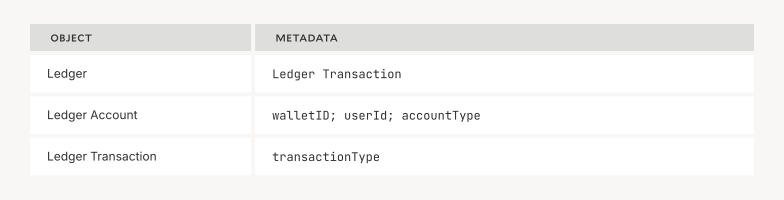
Example: To view all transactions for User Wallet #31512, you can use the List Ledger Transactions endpoint with a metadata filter. The system returns every transaction that touched this account within the requested timeframe.
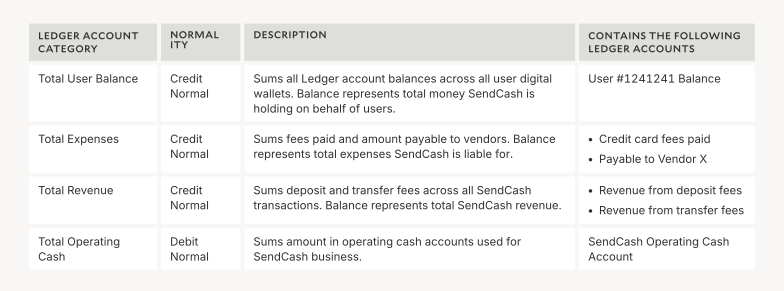
Defining Ledger Account Categories
Oftentimes, we need to retrieve a real-time roll-up balance across multiple ledger accounts.
For example, we'll often want to review the sum of all User Balance Accounts to compare against a Bank Account balance, ensuring that all the funds in that Bank Account are properly accounted for.
Ledger Account Categories can provide real-time access to aggregate balances to meet any UI or reporting needs.
Balance Locking
Sometimes you need to ensure a transaction only succeeds if the account has enough funds. Balance locking enforces that.
With balance filters, you can make a ledger transaction conditional on the account's current balance. If the transaction would push the balance below a threshold, the request fails with a 422 error.
Available balance filter types include pending_balance_amount, posted_balance_amount, and available_balance_amount. You can filter balances using the operators gt (>), gte (>=), eq (=), lte (<=), and lt (<).
If Adam wants to send $50 to Bree (like described in the previous section), but only if Adam stays ≥ $0 available_balance on his Ledger Account, the POST /ledger_transactions call would read as follows:
curl --request POST \
  -u ORGANIZATION_ID:API_KEY \
  --url https://app.moderntreasury.com/api/ledger_transactions \
  -H 'Content-Type: application/json' \
  -d '{
    "description": "Adam Apple wallet transfer to Bree Banana",
    "effective_at": "2025-09-29",
    "status": "posted",
    "external_id": "<wallet_transfer_id>",
    "ledger_entries": [
      {
        "amount": 5000,
        "direction": "credit",
        "ledger_account_id": "<bree_wallet_account_id>",
      },
      {
        "amount": 5000,
        "direction": "debit",
        "ledger_account_id": "<adam_wallet_account_id>",
        "available_balance_amount": {"gte": 0}
      },
      {
        "amount": 100,
        "direction": "credit",
        "ledger_account_id": "<revenue_account_id>"
      }
    ]
  }'
Learn More: Designing Your Chart of Accounts
Ledgers enforces double-entry accounting concepts, to ensure scalable consistency. If you are not familiar with debits and credits, start with our guide to debits and credits. We also recommend reviewing our guide to Ledgers Objects, as it explains Ledger Accounts, Transactions, and Categories in detail.
Balances are tracked in the Ledger by way of Ledger Accounts. Implementing a digital wallet often requires the following sets of accounts:
User Balance Accounts
- Funds available to each user for sending or withdrawal
- Exposed in UI, used to validate user transactions
Cash Accounts
- Real money associated with your wallet and held in your bank account
- Used for financial reporting and bank account reconciliation
Expense Accounts
- Money incurred in the operation of digital wallet product (card fees, etc.)
- Used for financial reporting
Revenue Accounts
- Track revenue streams captured by your digital wallet product (transfer fees, etc.)
We'll look at examples of each of these account types, next.
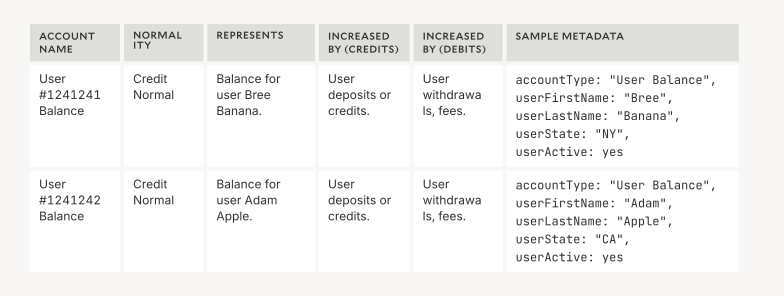
User Balance Accounts
User Balance Accounts are credit normal accounts that track user balances. These are credit normal accounts because they represent funds your platform owes to other parties, or sources of funds.
Your platform needs one Ledger Account per user. Ledger Accounts (like all Modern Treasury objects) can be enriched with free-form metadata:
Cash Accounts
Cash Accounts track different cash positions associated with the digital wallet app. They are debit normal given they represent funds your platform owns.
There are many different cash positions you might want to track in your digital wallet app:
- Reserve funds that hold cash available for user withdrawals
- Operating bank accounts holding pools of funds you direct income to and deduct expenses from
- Any other cash pools tied to operational or regulatory requirements

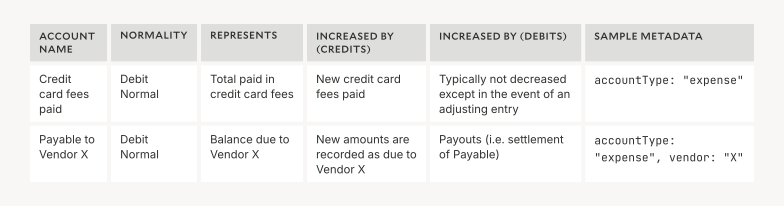
Expense Accounts
Expense Accounts track expenses incurred in the regular operation of the digital wallet app. These can be debit normal when they represent expenses paid (as they reflect money outflows in a regular course of business) and credit normal when they represent expenses due (as they reflect payables).
A few types of expense accounts include:
- Card fees incurred in the event of an account deposit or withdrawal
- Any taxes or fees to third parties paid on balances or transfers in the platform
- Banking fees associated with specific transactions
Revenue Accounts
Revenue Accounts track money inflows categorized as Revenue by your digital wallet app. They are always credit normal accounts.
Different Revenue Accounts can be created to differentiate between revenue streams.
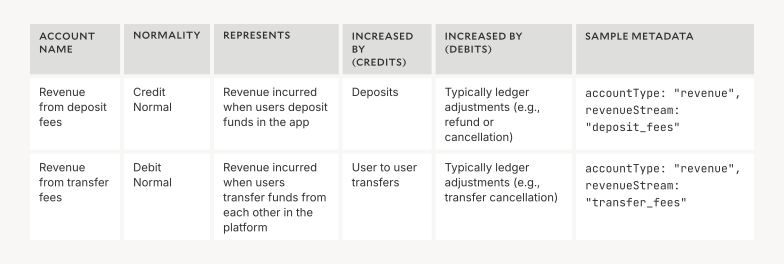
In digital wallet applications, you may instead charge usage or service fees separate from money movement (i.e., as an accruing invoice). In this case, as activity happens, you may accrue an outstanding invoice amount against two alternate accounts:
- User Receivable (debit normal): A receivable account tracking how much a user owes for fees. You can optionally create an account per invoice.
- Revenue (credit normal): Total revenue earned from fees. You can optionally track this amount as unreceived or unearned revenue until the fee has been paid.
Conclusion
Building a digital wallet is both a technical and strategic challenge. On the surface, a wallet looks like a simple balance and a button to send or receive funds. Underneath, it's a carefully orchestrated system of ledgers, accounts, payment rails, and reconciliation processes.
In this guide, we walked through:
- How digital wallets work and why companies embed them.
- Key architectural choices around FBO accounts, virtual accounts, and double-entry ledgers.
- The nuances of balance types—posted, pending, available, and credit-based—and how they impact user trust.
- A practical example of designing a wallet flow, from onboarding to payouts.
- The technical implementation details, with API calls to create ledgers, record transactions, and query balances.
- Advanced features like metadata, account categories, and balance locking to make wallets production-ready.
The takeaway is simple: a reliable wallet depends on a reliable ledger. By anchoring balances to immutable double-entry accounting, exposing clear APIs, and planning for edge cases like drift or concurrency, you can build financial products that scale without breaking trust.
Modern Treasury's platform exists to give developers and product teams the tools to make this possible. With our Ledgers API, Virtual Accounts, and Payments APIs, you can move from concept to production with confidence—whether you're launching a consumer app, embedding payments in a marketplace, or scaling a new kind of financial service.
Digital wallets are becoming a core feature across industries to unlock new business models, improve customer experience, and create more control over money movement.
If you're ready to take the next step, explore our documentation, check out our open-source resources, or reach out to our team. We've helped companies of every size build and scale digital wallets—and we'd be glad to help you do the same.
Get the latest articles, guides, and insights delivered to your inbox.